Vita Spider Solitaire
- 4.7
- Rating
- 1.00M
- Installs
- Free
- Price

 Analysis by App-foxy
I found Vita Spider Solitaire easy to approach because it focuses on one familiar card-game idea rather than surrounding it with a crowded collection of modes. It is a free card game from Vita Studio, built around Spider Solitaire and presented with older players in mind. After spending time with it, my main impression is that it works best as a calm, readable way to fill a short break, especially when I want a game that rewards attention without demanding fast reactions.
That simplicity is also the reason I would recommend it selectively. If you enjoy arranging cards, planning several moves ahead, and repeating a relaxing routine, this is a comfortable choice. If you want competitive play, a large variety of card games, or a highly customizable experience, it may feel narrow. Its store presence is strong, with a 4.7 average from roughly 133,000 ratings and more than a million installs, but popularity does not remove the need to consider whether its visual style and pace suit you personally.
How the game handles readability and navigation
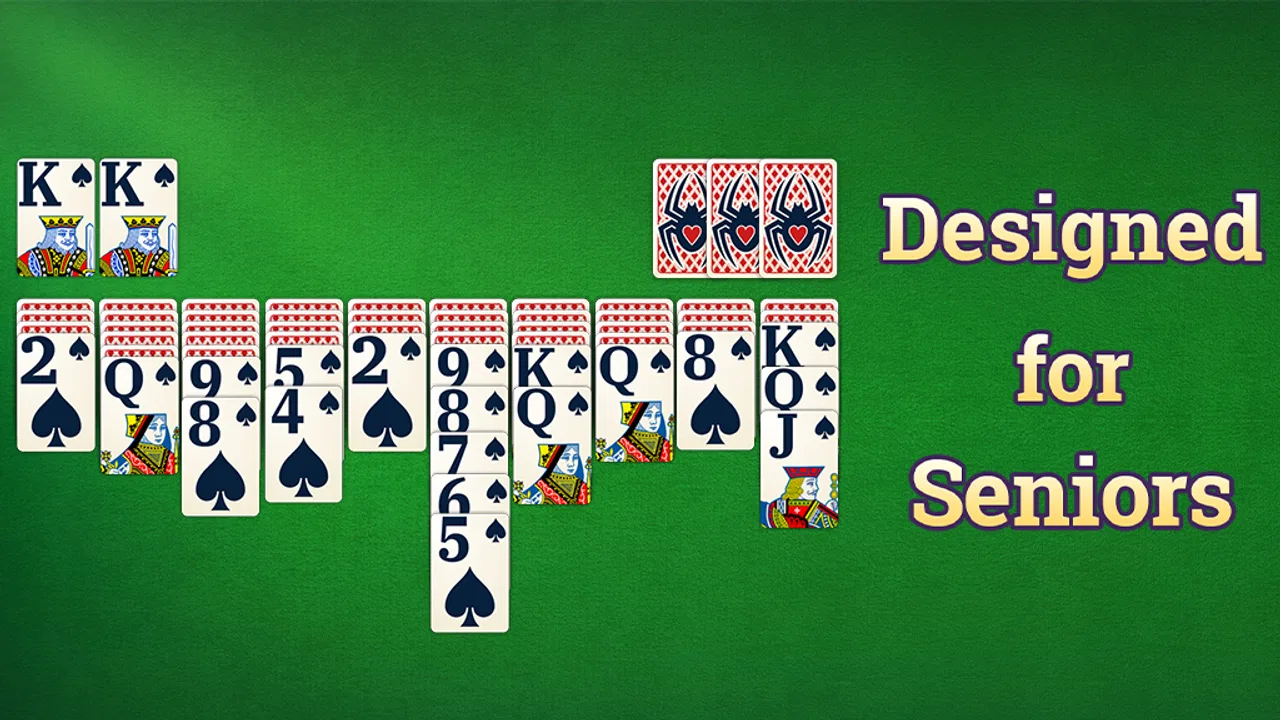
The most important design decision here is the emphasis on large cards. In a Spider Solitaire game, readability is not a minor convenience: the entire experience depends on recognizing suits, ranks, and card order repeatedly. Vita Spider Solitaire puts that practical need ahead of decorative complexity, which makes the board easier to inspect than many compact card games designed primarily for small screens.
You May Also Like

 Blood Strike: 2.5 Anniversary
Blood Strike’s Loadouts Turn Every Drop Into a Tactical Gamble
A close look at Blood Strike’s custom loadouts: how fast access to signature weapons reshapes its battle royale rhythm, rewards preparation, and narrows the gap between fights.

 Pandora - Music & Podcasts
Pandora’s Music Is Easy to Start, but Harder to Recover
Pandora’s strength is its low-effort path from a seed to a station. Its weak spot is how much confidence it asks you to place in connection, setup, and quiet recovery.

 8 Ball Pool
 Is Built on Rivalries, Rematches, and Routine
A close look at the rivalries, rematches, shared routines, and unanswered safety questions that turn a quick pool match into a persistent mobile community.

 Samsung Music
’s Quiet Strength Is Playing What You Already Own
Its reach comes less from spectacle than from dependable access to a personal library. That simplicity is both the app’s strongest retention engine and its ceiling.

 AccuWeather: Weather Radar
AccuWeather Review: A Quick, Clear Forecast for Everyday Decisions
For everyday plans, the best forecast is the one you can understand quickly. AccuWeather makes rain timing, radar, and local conditions easy to act on, with a few trade-offs.

 Hill Climb Racing
Why Hill Climb Racing Still Turns Crashes Into One More Run
A tiny car, a bumpy hill and one more upgrade: Hill Climb Racing keeps resurfacing because its simple chaos makes every near-miss feel personal.
More From Our News Desk



I especially appreciate this when I am playing on a phone rather than a tablet. A crowded solitaire layout can turn a relaxing session into a constant effort to distinguish one card from another. Larger card faces reduce that strain and make it easier to return to the game after looking away. The result is not necessarily perfect for every screen or every eyesight level, but the visual priority is sensible and consistent with the game’s intended audience.
Navigation also benefits from the limited scope. I do not have to learn a complicated economy, manage a character, or understand several unrelated menus before starting a hand. That makes the first session less intimidating for someone who has not played a digital Spider variant recently. The basic rhythm is recognizable: inspect the columns, uncover useful cards, build sequences, and decide when to use the stock.
One useful habit is to pause before making the first move instead of immediately tapping the most obvious exposed card. The larger presentation makes it easier to scan the whole arrangement, and Spider Solitaire rewards that wider view. I find the game more enjoyable when I treat each deal as a small planning exercise rather than a race to clear a column.
The current version is 1.27.1, and the game runs on Android devices using version 7.0 or later. That gives it a relatively broad technical reach for people using older compatible phones, although the real experience will still depend on screen size, display quality, and how comfortably the device responds to touch.
Why the visual approach matters for older players
Calling attention to older players is meaningful here because card games often become frustrating for reasons unrelated to their rules. Small symbols, thin lettering, low contrast, or a board that changes too quickly can make a familiar pastime feel inaccessible. Vita Studio’s choice to make the cards prominent addresses one of the most common obstacles directly.
I would still suggest trying the game in the same conditions where it will normally be used. A bright room, glare on the screen, or a phone held farther away can change how comfortable the cards feel. Someone who usually plays on a tablet may find the layout much more relaxed than someone using a small phone. The game’s visual simplicity helps, but it cannot compensate for every individual vision need.
Another advantage is cognitive rather than purely visual. Because the central task stays stable, I can concentrate on card order instead of learning a new interface on every visit. That makes it suitable for a quiet daily routine: a few hands after breakfast, a short session while waiting for an appointment, or a gentle way to wind down before bed.
Touch control, pace, and different playing abilities
Spider Solitaire is naturally slower than action games, and that gives Vita Spider Solitaire an important advantage for players who do not want to rely on rapid taps. The game is based on observation and decision-making. I can look at the columns, consider the consequences, and then make a move without feeling pressured by a timer or an opponent waiting for my response.
That slower pace can be helpful for people with limited dexterity or anyone who simply prefers deliberate interaction. It also makes the game less tiring during a short break. I do not need precise repeated gestures at high speed; the challenge comes from choosing the right card sequence. For many players, that is a more comfortable form of engagement than games built around reflexes.
There is a trade-off, though. Touchscreen card games still require accurate tapping, and a player with hand tremors, reduced finger control, or difficulty targeting small areas may find certain moves awkward. Large cards help identify the target, but they do not automatically make every touch easy. I would be cautious about recommending it as a solution for serious motor limitations without trying it on the intended device first.
The game’s relaxed structure also suits players who need to stop unexpectedly. A hand can fit into a spare moment, and the lack of competitive pressure means an interruption is less stressful than it would be in a live multiplayer match. In my experience, that makes it a better companion for fragmented time than many card apps that expect a continuous session.
A realistic everyday use case
Imagine waiting while a family member attends an appointment. You have a phone, a few quiet minutes, and no interest in reading a complicated tutorial. Vita Spider Solitaire can fill that gap with a familiar activity: open a hand, examine the columns, make a few careful moves, and stop when the appointment is over. The large cards make it easier to glance down and resume, while the slow pace means there is no penalty for taking a moment to think.
That scenario also shows where the game is less suitable. If you need something to occupy you while walking, commuting in a crowded vehicle, or dealing with frequent movement, a touch card layout may be harder to use safely and accurately. This is a sit-down game, even when the session itself is brief.
Sound, attention, and sensory comfort
Card games can become tiring when they rely on constant animation, loud feedback, or visually busy backgrounds. Vita Spider Solitaire feels more appropriate for players who want a quiet, focused activity. The core board remains the thing that matters, so I can play while keeping the surrounding environment calm.
That does not mean every sensory preference will be covered. Some players want extensive control over animation, sound, contrast, or card appearance, while others are satisfied with a straightforward presentation. I would choose this game for its uncluttered card-focused experience, not because it replaces a specialist accessibility tool or guarantees comfort for every sensitivity.
A practical tip is to play with the phone positioned steadily on a table when possible. That reduces the need to grip the device while planning a move and makes the card columns easier to compare. It is a small change, but it can make a longer session more comfortable for someone whose hands tire quickly.
Using it in different situations
The free entry point is helpful for casual players who want to try the game without committing money first. It is also suitable for households where someone may only play occasionally. The content rating is Everyone, which matches the nonviolent, traditional nature of the activity and makes it an uncomplicated choice for a broad audience.
There are in-app purchases ranging from $1.99 to $9.99 per item. That matters even in a simple solitaire game because a free download can still present optional spending during use. I would treat the no-cost version as the sensible starting point and decide later whether any paid item genuinely improves the personal experience. For a player who only wants an occasional hand, spending may not add much value.
For someone who plays every day, the decision is more nuanced. A familiar game can become part of a routine, and paying for a convenience may feel reasonable if it removes an annoyance. However, the game’s main appeal is already present in its basic card activity. I would not choose it expecting a deep progression system or a constantly expanding collection of content; its strength is the focused Spider format.
Compared with a physical deck, the app is more convenient when I am alone, traveling lightly, or do not have a table large enough for cards. It also avoids the need to gather and reshuffle a deck after every hand. The physical alternative remains better for social play, tactile enjoyment, and people who dislike looking at screens. Vita Spider Solitaire is a digital substitute for solitary card time, not a replacement for sitting across from another person.
Compared with broader solitaire collections, this game is more specialized. A larger collection is better if you regularly switch between Klondike, FreeCell, Pyramid, and other formats. Vita Spider Solitaire is the better fit when Spider is the game you actually want and you prefer not to navigate a library of unrelated options.
Compared with competitive online card games, it is much calmer. There is no need to manage another player’s pace or worry about a ranking atmosphere. That is a major benefit for relaxation, but it also means users looking for social interaction will probably find it lonely. The game is designed around personal concentration rather than conversation or competition.
Small habits that improve the experience
My first recommendation is to use the larger display available to you. If both a phone and tablet are convenient, the tablet is likely to provide a more spacious view of the columns, while the phone is better for portability. The game’s central design idea works on either, but comfort is more important than convenience when the purpose is to relax.
My second recommendation is to avoid treating every deal as something that must be solved immediately. Spider Solitaire often becomes more enjoyable when I spend a few seconds identifying blocked cards and possible empty-column opportunities. That approach also helps players who need a slower pace, because it turns the session into a visual puzzle rather than a sequence of hurried taps.
Third, I would keep the game for moments when I can sit still and focus. It is tempting to open a card game whenever there is a spare second, but the layout deserves enough attention to prevent accidental moves. Using it during a calm pause produces a better experience than trying to play while multitasking.
Where the inclusive design still has limits
The game’s strongest inclusive quality is its restraint: familiar rules, prominent cards, and a pace that does not depend on reflexes. Those choices support older players and anyone who wants a low-pressure activity. They are practical decisions rather than empty promises, and I noticed their value most when playing in short sessions or returning to a hand after a distraction.
At the same time, large cards should not be confused with complete accessibility. Players with severe visual impairments may need tools or settings that are not part of this straightforward presentation. Players with significant motor difficulties may still struggle with touch targeting. People who rely on screen readers, specialized switches, or highly customized contrast should investigate the experience on their own device before making it a regular part of their routine.
The game can also be a poor choice for people who need stimulation from variety. Its narrow focus is calming for me, but it could feel repetitive if Spider Solitaire is not already a favorite. Someone seeking daily challenges, social play, or a strong sense of progression may be happier with a broader card platform, even if that alternative is visually busier.
There is also the question of spending. The game is free, but optional purchases create a reason to pay attention during use, particularly on a shared device or for a player who may tap through menus without fully understanding them. I would set expectations clearly for less experienced users and, where appropriate, use the device’s purchase controls. That is not a criticism unique to this title; it is simply part of using a free game with paid items responsibly.
Finally, the older Android requirement is friendly to many existing devices, but compatibility alone does not guarantee a comfortable screen. A phone can run the game and still be too small, dim, or awkward for a particular player. The best test is practical: install it on the device that will actually be used, open a hand in normal lighting, and check whether the cards can be read without squinting or repeated zooming.
A calm recommendation for the right kind of card player
I recommend Vita Spider Solitaire to anyone who wants a focused Spider Solitaire experience with a readable card presentation and an unhurried rhythm. It is especially appealing for older players, people who prefer familiar rules, and users who want a quiet activity during short periods of free time. The Everyone rating and free download make it easy to try, while the large-card approach gives it a clear identity beyond simply placing a deck on a screen.
I would skip it if your priority is multiplayer interaction, a wide range of card games, fast action, or extensive personalization. I would also be careful if you have specific visual or motor requirements that ordinary large cards may not address. In those cases, a more configurable app or a physical deck with another person could be a better match.
For me, the appeal is not novelty. It is the way the game turns a familiar puzzle into a manageable digital routine. I can play attentively without rushing, stop when life interrupts, and return without having to relearn a complicated system. Vita Studio has kept the experience focused, and that focus is both its main strength and its main limitation.
Overall, this is a thoughtful choice for relaxed solo card play rather than an all-purpose gaming app. Its 4.7 average and broad audience make sense because the basic experience is approachable, but the best recommendation depends on the player’s needs: choose it for readable, low-pressure Spider Solitaire, not for variety or social competition.
FAQs for Vita Spider Solitaire
01What is Vita Spider Solitaire, and how does it differ from other solitaire games?
Vita Spider Solitaire is a classic card game app designed for both Android and iOS devices. It offers a unique twist on traditional solitaire by incorporating multiple suits and varying difficulty levels. Unlike other solitaire games, Vita Spider Solitaire challenges players with its strategic gameplay, requiring both skill and patience to master.
02Is Vita Spider Solitaire suitable for beginners?
Yes, Vita Spider Solitaire is suitable for beginners. The game offers different difficulty levels, starting from one suit for beginners to four suits for advanced players. This allows new users to learn the basics of the game at their own pace before taking on more challenging levels as they become more confident.
03Does Vita Spider Solitaire require an internet connection to play?
No, Vita Spider Solitaire does not require an internet connection to play. The game is fully functional offline, making it a great choice for users who want to enjoy a relaxing game of solitaire without worrying about data usage or connectivity issues. However, some features like leaderboards may require internet access.
04Are there any in-app purchases in Vita Spider Solitaire?
Yes, Vita Spider Solitaire includes optional in-app purchases. While the game can be enjoyed for free, these purchases may include additional themes, card designs, or ad removal options. These purchases are entirely optional and designed to enhance the player's experience without affecting the core gameplay.
05What devices are compatible with Vita Spider Solitaire?
Vita Spider Solitaire is compatible with a wide range of devices. It is available for both Android and iOS platforms, supporting most smartphones and tablets. The app is optimized to run smoothly on various screen sizes and resolutions, ensuring a seamless gaming experience regardless of the device used.
Pros
- Smooth and intuitive user interface.
- Variety of card designs and themes.
- Daily challenges for extra rewards.
- Offline mode available.
- No intrusive ads during gameplay.
Cons
- Limited hints in free version.
- Occasional lag on older devices.
- In-app purchases can be pricey.
- No multiplayer mode.
- Requires frequent updates.

Vita Spider Solitaire
Gallery